Enabled, inactive, and gone: the firewall that didn't survive a reboot
A server came back from a reboot with every chain empty and the policy set to ACCEPT, while it was being brute-forced. Its firewall services were enabled. They simply never ran. Three wrong answers came before the right one.
A public-facing server was found with no firewall at all.
Not a weak firewall — none. Every chain empty, every policy ACCEPT, no Fail2Ban jail. The failed-login log showed what that meant in practice: one source address alone had tried and failed to log in over SSH 15,564 times. The machine had been rebooted six days earlier. Before the reboot, it had been running the generated ruleset like every other node.
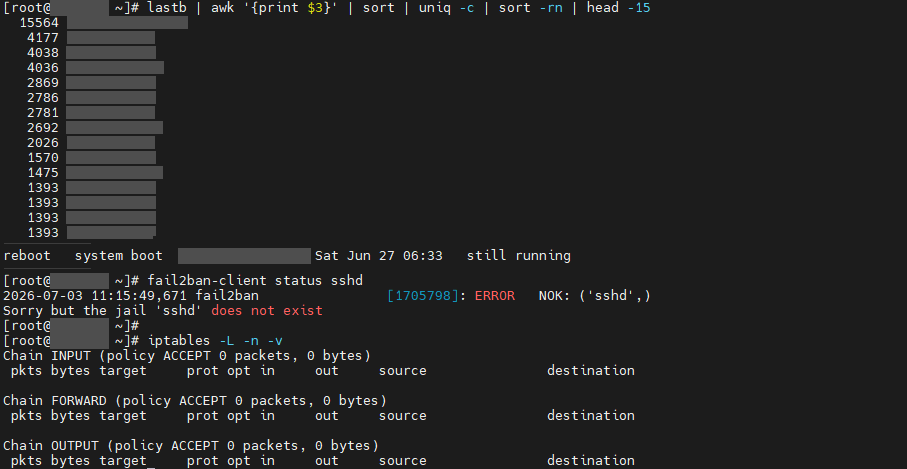
ACCEPT. (Addresses, host name and kernel version redacted.)My team lead set the order of work: make sure the firewall is always up, then add a Fail2Ban SSH jail, then add alerting. This is the story of the first item, which turned out to be much deeper than “restart the service”.
Three layers that have to cooperate at boot
- iptables. The ruleset lives in a text file,
/etc/sysconfig/iptables, and is loaded atomically withiptables-restore. At boot,iptables.servicedoes that load. - IPSets. Named sets of addresses — blocklists, allowlists — that the rules match against. They live in kernel memory, so they are gone after a reboot unless
ipset.servicerestores them from/etc/sysconfig/ipset. - systemd, which decides what runs at boot, and in what order.
One dependency ties them together, and it is the seed of everything below. A rule like -m set --match-set blocked_http src -j DROP cannot load if the set does not exist — and because iptables-restore is atomic, one missing set does not give you a partial firewall. It gives you no firewall.
Wrong answer 1: the missing sets
The first attempt to load the ruleset by hand failed with Set blocked_http doesn't exist. The rules referenced sets that had never been created on that node, or never saved. Creating and persisting them fixed the immediate load.
After a real reboot, the node came back empty again.
Wrong answer 2: the package that disabled the firewall
To make the sets survive a reboot, the installer started enabling ipset.service. Installing that unit’s package pulled in the distribution’s iptables services package as a dependency — and that package’s post-install scriptlet printed one quiet line:
Removed "/etc/systemd/system/multi-user.target.wants/iptables.service"The fix for boot persistence had disabled the service that loads the firewall at boot. Nothing failed. systemctl is-enabled iptables just said disabled afterwards.
The lesson I kept: package installs can rewire systemd through their scriptlets. After installing anything that ships a service, re-assert the enable state you want, and check it.
Wrong answer 3: my own installer
The installer guarded the enable step with systemctl list-unit-files | grep -q '^ipset\.service'. Under set -o pipefail, that condition reads false exactly when the unit exists, so the enable was skipped — silently. That one deserves a post of its own, because it bit me again later somewhere much more visible.
The real one: enabled, and never scheduled
With all three fixed, both units were enabled, with valid symlinks. The node was rebooted. It came back with no firewall.
This is where reading the machine, rather than guessing, turned it around:
journalctl -b -u iptables.service -u ipset.service   # -- No entries --
journalctl -b | grep -iE 'ordering cycle'            # nothing
systemctl status iptables                            # enabled; Active: inactive (dead)
inactive (dead) is not failed. failed means the unit ran and its process errored. inactive (dead) means it never started during this boot at all — skipped by a condition, or never made it into the boot transaction. No journal entries is consistent with the second: there was nothing to log, because nothing ran. That one word moved the question from why does it crash? to why is it never scheduled?
Meanwhile Fail2Ban — also enabled, on the same machines — started on every boot.
systemctl show gave the difference. Both firewall units are tied to network-pre.target: ordered before it, and wanting it. That is a passive target. systemd’s own documentation says such targets “are generally not part of the initial boot transaction, unless they are explicitly pulled in” by a service that implements them. On these hosts it never activated — and the firewall units never ran. Fail2Ban is wired to plain network.target and multi-user.target, and those always do.
That is the root cause I recorded, and it fits every observation. But the evidence that decided the fix was simpler than any theory about the boot transaction: a unit wired like Fail2Ban’s started every single time.
The fix: stop depending on a mechanism that doesn’t run here
Rather than keep forcing the distribution’s two-service arrangement, I replaced it with something small enough to fully control:
- One script that restores the IPSets and then loads the ruleset — in a single process, so the ordering is guaranteed by the order of two lines, not by a dependency between services.
- A oneshot unit wired exactly like Fail2Ban’s:
After=network.target,WantedBy=multi-user.target. - An independent
@rebootcron entry running the same script. If either trigger fires, the firewall is up. The script is idempotent, so both firing is harmless — and on the first real test, both did.
The first version shipped under its own unit name. It was later folded back under the standard iptables.service name, overriding the distribution’s unit, so that operators and other tooling still find the firewall where they expect it to be.
[Unit]
Description=Restore IPSets then iptables firewall at boot
After=network.target

[Service]
Type=oneshot
RemainAfterExit=yes
ExecStart=/usr/local/sbin/firewall_boot_restore.sh

[Install]
WantedBy=multi-user.target
Proving it without gambling a reboot
Every reboot of a remote machine you are changing the firewall on is a bet. So each attempt was rehearsed first: systemctl restart ipset destroys the sets and restores them from the saved file, then starting the firewall exercises the load. Only when that passed did the machine get a real reboot.
The access path could not be lost during any of this: the control node’s address is in every generated ruleset, and every apply is tested with iptables-restore --test and backed up before it is committed.
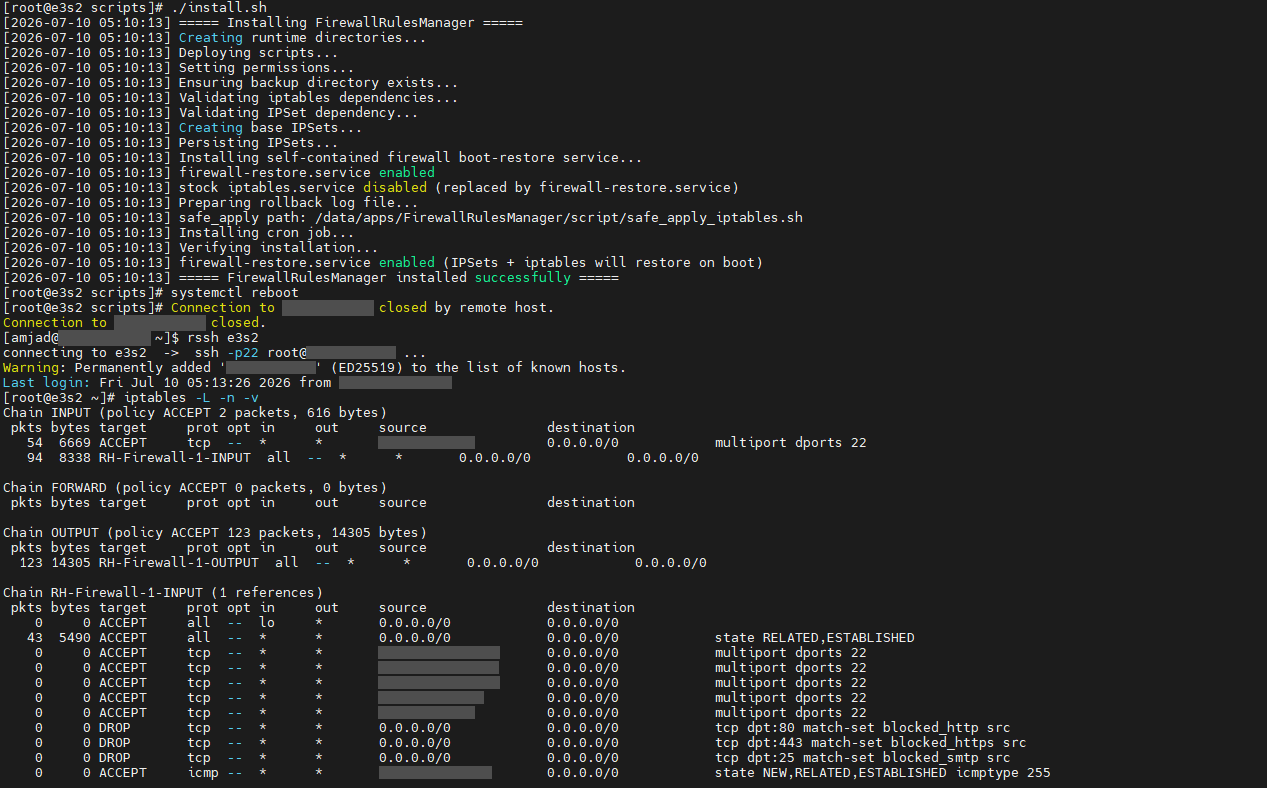
DROP rules that match against IPSets have loaded — which they could not have done if the sets had been missing. (This run used the interim unit name. Addresses redacted.)What I would add, and what I took from it
Alert on what the kernel has loaded, not on what systemd says. The exposure lasted six days. A check that counts rules actually present — and pages someone when the count drops to zero — would have caught it the same morning. Monitoring the service would not have: it said enabled throughout.
# ask the kernel, not the service manager
n=$(iptables -S INPUT | grep -c '^-A')
[ "$n" -gt 0 ] || echo "CRITICAL: INPUT chain is empty"- Enabled plus symlinked does not mean it will run. It means someone asked for it to run.
inactive (dead)andfailedare different investigations. Read the word before reading the logs.- Dependencies that must happen in order belong in one process when you can put them there.
- When a platform mechanism is environmentally broken, a small replacement you fully control can beat the “correct” abstraction — as long as it keeps the names people expect, and you can prove it works.
- Redundant triggers are only safe when the action is idempotent. That is what made the cron backup free.
This was the worst defect in the firewall automation platform, and it was not in the generator or the deployment path at all. It was at boot.
References
- systemd.special(7) —
network-pre.target, and what makes a target passive. - systemd.unit(5) —
Wants=,WantedBy=,Before=/After=: pulling in versus ordering. - systemctl(1) —
is-enabled,is-activeand unit states. - iptables-restore(8) — atomic load, and
--test. - ipset(8) —
save,restore, and thesetmatch.