Every firewall refresh deleted Fail2Ban's bans
Fail2Ban was banning brute-force sources correctly. Then the firewall platform redeployed its ruleset, as it does on every change, and the bans were gone. Two tools were writing to the same table, and only one of them knew.
Two tools protected the same hosts, and each was doing its job.
The firewall platform compiles a complete ruleset for each host from a central database and applies it with iptables-restore. It does that on every policy change and on a periodic sweep, because the firewall is meant to be a faithful projection of the database — nothing more, nothing less.
Fail2Ban watches authentication logs and bans addresses that fail too often. With its classic iptables actions, it does that by creating its own chain inside the firewall’s filter table — one per jail — and adding a rule per banned address.
On one control node, one of those jails lived exactly there: a chain in filter, full of live bans. Then the firewall refreshed.
What “atomic” costs you
iptables-restore is the right way to apply a firewall. It loads a whole table from a file and commits it in one step, so there is never a half-applied ruleset — and it is much faster than hundreds of separate iptables calls.
The price of “the whole table” is that the table ends up containing exactly what the file says, and nothing else. By default, iptables-restore flushes each table it restores before loading it. Every chain in filter that is not in the generated file — including Fail2Ban’s, and every ban in it — is gone.
Nothing errors. The firewall platform did what it was designed to do. Fail2Ban’s view of its own bans no longer matched the kernel, and the addresses it had banned could connect again. Every refresh quietly unbanned the attackers.
The options
Include the bans in the generated ruleset. The generator compiles policy — declared intent from a database. Bans are runtime state, owned by a daemon that adds and expires them minute to minute. Copying one into the other would make the generator responsible for state it does not own, and every ban made between two refreshes would still be lost.
Restore without flushing. iptables-restore --noflush keeps what is already there. It also keeps what the generator removed — a revoked rule would survive the refresh that was supposed to revoke it. The whole point of compiling the firewall is that the file is the truth; --noflush gives that up for everything, to protect one chain.
Give Fail2Ban its own table. This is what the managed nodes were already doing, and what the control node was moved to: Fail2Ban’s nftables-multiport ban action, which keeps its bans in a separate nftables table, inet f2b-table.
Why a separate table works
On these hosts, iptables is the nftables-backed variant. iptables-restore rewrites the tables it restores — the iptables filter table — and nothing else. A separate nftables table is a different object; a restore never touches it.
Two tables hooked into the same place both see every inbound packet, so the separation costs nothing in coverage. And the order is on Fail2Ban’s side. Its chain hooks input at priority -1, ahead of the iptables filter chain at 0, and in nftables a drop verdict is final: “drops take immediate effect, with no further rules or chains being evaluated.” An accept, by contrast, only ends evaluation in its own chain. So a banned address is dropped before the firewall’s policy is even consulted, and nothing the policy says can let it back in.
The platform’s own dynamic lists already worked on the same principle. Blocklists are IPSets — kernel sets that a single rule matches against. The sets are separate objects from the rules, so a ruleset reload does not empty them, and adding an address takes effect immediately without a reload at all.
Moving it without breaking SSH
Changing how a brute-force defence works, on the machine you are logged in to, has its own risks. The migration script was built around them:
- Validate before restarting.
fail2ban-client -tchecks the configuration first, so a bad jail definition cannot take down a working SSH jail. - Never ban ourselves.
ignoreipholds localhost and the management, control, office and backup addresses. Customers stay bannable. - Order matters. It runs after a firewall apply, because the apply flushes the stale iptables jail chain and leaves a clean slate for the nftables one.
Then the part that matters most: prove the ban path works, instead of assuming it.
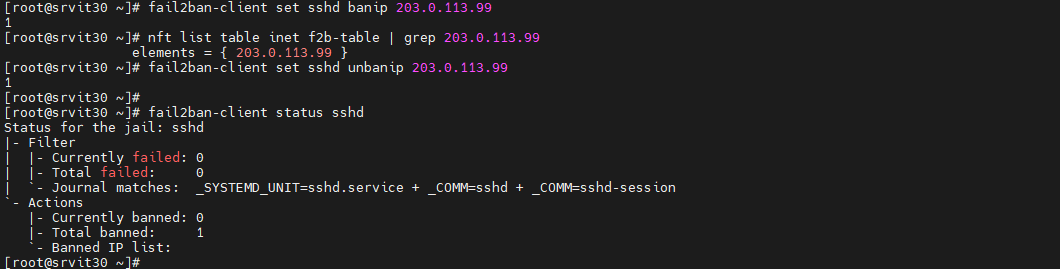
A ban that Fail2Ban reports but the kernel does not enforce is the failure this whole post is about. The only way to know it is not happening is to look in the table.
What I took from it
- One owner per table. If two tools write the same table, the one that replaces it wholesale will eventually delete the other’s work — and neither will report an error.
- An atomic replace deletes everything you did not put there. That is the feature. Know what else lives in the object before you replace it.
- Keep compiled policy and runtime state apart. Policy is reproducible from source; runtime state is not, so it needs to live somewhere the compiler cannot reach.
- Verify the enforcement, not the report.
fail2ban-client statustells you what Fail2Ban believes.nft list tabletells you what the kernel will do.
This came out of the firewall automation platform, where the ruleset is compiled from a database and applied atomically on every change.
References
- iptables-restore(8) — tables are flushed before restoring unless
--noflushis given. - nftables wiki: base chain priority — drop is final; accept is not, when another chain shares the hook.
- Fail2Ban
nftablesaction — defaults:inet f2b-table, input hook, priority-1. - ipset(8) — sets are kernel objects separate from the rules that match them.
- RFC 5737 —
203.0.113.0/24, the documentation range used for the ban test.