What sudo actually matches
A sudoers rule reads like a list of allowed commands. sudo reads it as a pattern over one joined string, with a literal interpreter path, a scrubbed environment, and complete trust in the filesystem. Five things that mattered when locking down scripts the web tier runs as root.
Some scripts have to run as root on behalf of something that is not root. On the certificate and firewall platforms I worked on, the web tier needed to install a certificate, move an nginx config aside, or open port 443 — each a root operation, each triggered by a PHP process.
The standard answer is a sudoers rule that allows exactly those commands. That rule then becomes one of the most important lines in the security design, because it is the whole boundary between “the web server was compromised” and “root was compromised”.
It reads like a list of allowed commands. sudo does not read it that way. These are the five places where the difference mattered.
1. The arguments are one string
sudo does not compare arguments one by one. It joins them with spaces into a single string and matches the rule’s pattern against that. The sudoers manual is blunt about the consequence: “Wildcards can match any character, including white space.”
That cuts both ways, and both ways were used on purpose.
A trailing * covers every form of call. The certificate scripts are listed as script.py * — one entry each — because * matches --domain x --flag, x, and anything else the script accepts. That is only acceptable because each script validates its own arguments and refuses anything it does not recognise. The rule narrows; the script decides.
A literal after a wildcard anchors the end. The firewall bridge takes a server ID and an action. Its rule pins the action:
/usr/bin/bash /opt/fw/open_443.sh * add, \
/usr/bin/bash /opt/fw/open_443.sh * add --json, \
/usr/bin/bash /opt/fw/open_443.sh * remove, \
/usr/bin/bash /opt/fw/open_443.sh * remove --json
* add matches any argument string that ends in add. So srv1 add matches, but srv1 add --json does not — which is why the JSON forms are listed separately, four entries instead of one. And because * can swallow spaces, * add also matches srv1 --json add. The pinned action narrows the rule, but it is still the script that must reject a malformed call.
Two more details worth knowing:
- An argument list of exactly
""means no arguments allowed at all. A rule for a script that takes none — like the firewall refresh the UI triggers — can say so, and then nobody can append anything. It is only valid as the whole argument list; put it after other arguments and ordinary calls stop matching. - Since sudo 1.9.10, arguments can be matched with a regular expression (
^…$), which the manual itself calls “usually safer” than wildcards.
2. The interpreter is the command
For a script, the “command” sudo sees is the interpreter: /opt/certbot-venv/bin/python /path/cert.py …. sudo compares that path literally. The same script run through /usr/bin/python3 is a different command, and it is refused before the script ever starts.
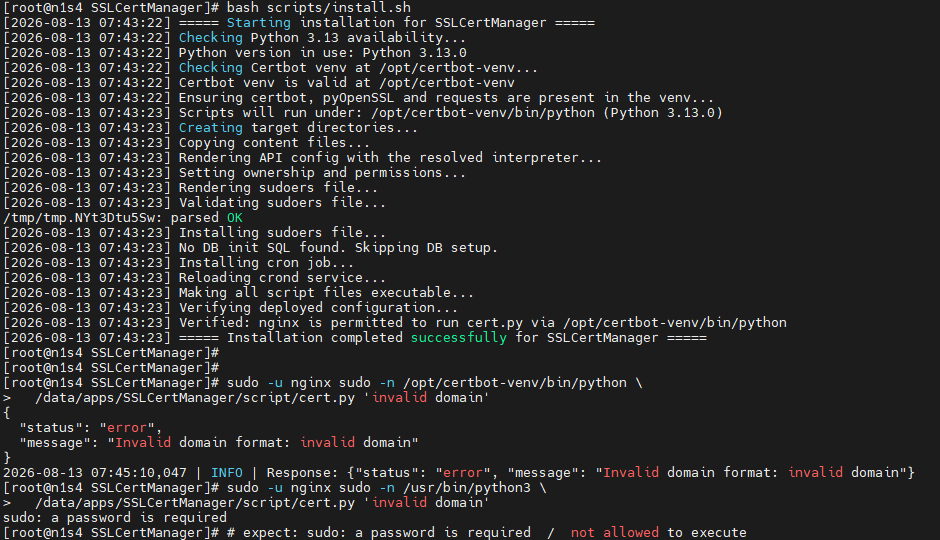
That is a security property: nobody can point a different interpreter, with different modules on its path, at the script. It is also an operational trap. The sudoers file, the API that builds the command and the cron job must all name the same binary, or every call fails with a password prompt nobody can answer. So the installer resolves the interpreter once, renders that path into every file that names it — refusing to leave a half-rendered file behind — then checks that the API’s config and the sudo rule agree, and finishes by asking sudo itself: sudo -l -U <user> lists exactly what a user may run.
3. The environment does not come with you
The firewall refresh has a fan-out to the managed nodes that can be turned off with an environment variable. This looks like it should work:
FW_FANOUT=0 sudo bash refresh_master.sh # fan-out still runsIt does not. That sets the variable for the sudo process. With env_reset — the default — sudo runs the command in a minimal environment: PATH, HOME, TERM, a few others. FW_FANOUT is stripped before the script starts, the script falls back to its default, and the fan-out runs silently — the exact thing the caller tried to prevent.
Putting the variable after sudo — sudo FW_FANOUT=0 bash … — passes it to sudo as a request to set it. Whether that is allowed depends on the rule: permitted when the rule has the SETENV tag or allows ALL, refused otherwise. Refused is at least loud.
The real fix was not an environment variable at all. It was a flag, --no-fanout, which travels as an argument, which sudo does not strip. Anything a privileged script needs to be told should be an argument.
4. A file is only as safe as its directory
A root-owned script with mode 0755 looks safe: only root can change it. But replacing a file does not require writing to it. Renaming or deleting a directory entry needs write permission on the directory. If the directory is writable by other users, anyone who can write there can move the script aside and put their own file at the same path — and the sudo rule will run that as root.
sudo is strict about the permissions of its own configuration files. It does not audit the files your rules point at, or the directories above them.
This was not theoretical. Template scripts that were deployed fleet-wide and executed as root had been world-writable — one at 0777, one group-writable by the web server’s user. Anyone who could write to them held root on every server that ran them. That was fixed before I handed over. The check is the whole path: every directory from / down to the script must be unwritable by anyone the rule is meant to constrain. The sticky bit on a shared directory changes the rules for deletion and renaming, which is why /tmp survives being world-writable — but a script directory should not be relying on that.
5. Name the people, not the group
The obvious way to grant the rule was to the group every relevant account was already in. That group had thirteen members, including the web server’s own user and several people the rule was never meant for. Granting it would have given every one of them — and anything that compromised the web server — the right to run the scripts as root.
So the rule enumerates the accounts that actually make the call, in a User_Alias. It is longer. It also means that adding someone is a deliberate act, visible in review, rather than a side effect of a group membership granted for something else.
And before any of it: validate the file
A syntax error in a file under /etc/sudoers.d/ can break sudo for everyone on the machine — including the administrator who needs sudo to fix it. So the rendered file is checked before it is installed, and installed with the permissions sudo expects:
visudo -cf ./ssl-firewall
install -m 0440 -o root -g root ./ssl-firewall /etc/sudoers.d/ssl-firewall
What I took from it
- Read a rule the way sudo does: one binary path, one joined argument string, one pattern.
- Wildcards narrow; they do not validate. The script that runs as root must validate its own arguments.
- Pass instructions as arguments, never as environment variables — sudo strips the environment, and it does so silently.
- Check the directory, not just the file. Replacement beats modification.
- Enumerate people. A group is a list someone else maintains.
These rules sit under the SSL certificate automation and the firewall platform, where the web tier triggers root operations through exactly this kind of boundary.
References
- sudoers(5): Wildcards — “Wildcards can match any character, including white space.” Also
""as an argument list. - sudoers(5): Regular expressions —
^…$matching for arguments, from 1.9.10. - sudoers(5): env_reset, and the
SETENVtag. - sudo(8) —
-land-U: ask what a user may run. - visudo(8) —
-cand-f: check a file before installing it. - rename(2) — write permission on the directory, and the sticky-bit exception.